Salesforce
Your Agent Isn’t Broken. Your Architecture Is.
Lessons from the $48,000 API bill at TDX 2026.
A support automation agent went live. Simple brief: answer common questions using knowledge articles and account data. The first few days were excellent. Then the responses started taking longer. The agent began calling tools repeatedly, sometimes in strange orders. Some answers stopped making sense.
One week in, the team checked the bill. The agent had burned through $48,000 in API calls. It had also modified several CRM records incorrectly. And the worst part: nobody on the team could explain why.
That story opened one of the strongest sessions at TDX San Francisco 2026: Design Before You Build — Blueprints for Better Agents. The presenters had spent the last year building agents and rescuing the ones that hadn’t worked. The takeaway lands harder when they say it: agents that work in demos are not the same as agents that survive in production.
The model wasn’t the problem. The architecture was. Or rather, there wasn’t one.
Below: the five failure modes that show up across every broken agent the presenters had seen, the seven design principles that prevent them, and a practical way to apply this to your next Agentforce build.
The $48,000 API bill, in full
Here is what actually happened, reconstructed from the post-mortem the presenters shared.
A team built a support agent. The intent was loose: “help customers with common questions.” The tool inventory was generous: knowledge search, account lookup, case creation, case update, record modification, escalation. Memory was the default: full transcript appended to every prompt. There was no failure recovery plan. There was no observability.
In the first few days, with low volume and easy questions, none of that mattered. The agent answered things, customers were happy, the team called it a win.
Then volume grew. Edge cases arrived. The agent started getting confused. When a tool returned an unexpected response, it didn’t know what to do, so it called the tool again. And again. And again. Conversation history kept growing in the prompt, so each new call cost more tokens than the last. The agent started picking the wrong tool because its context window was now full of irrelevant noise. It modified records it shouldn’t have touched.
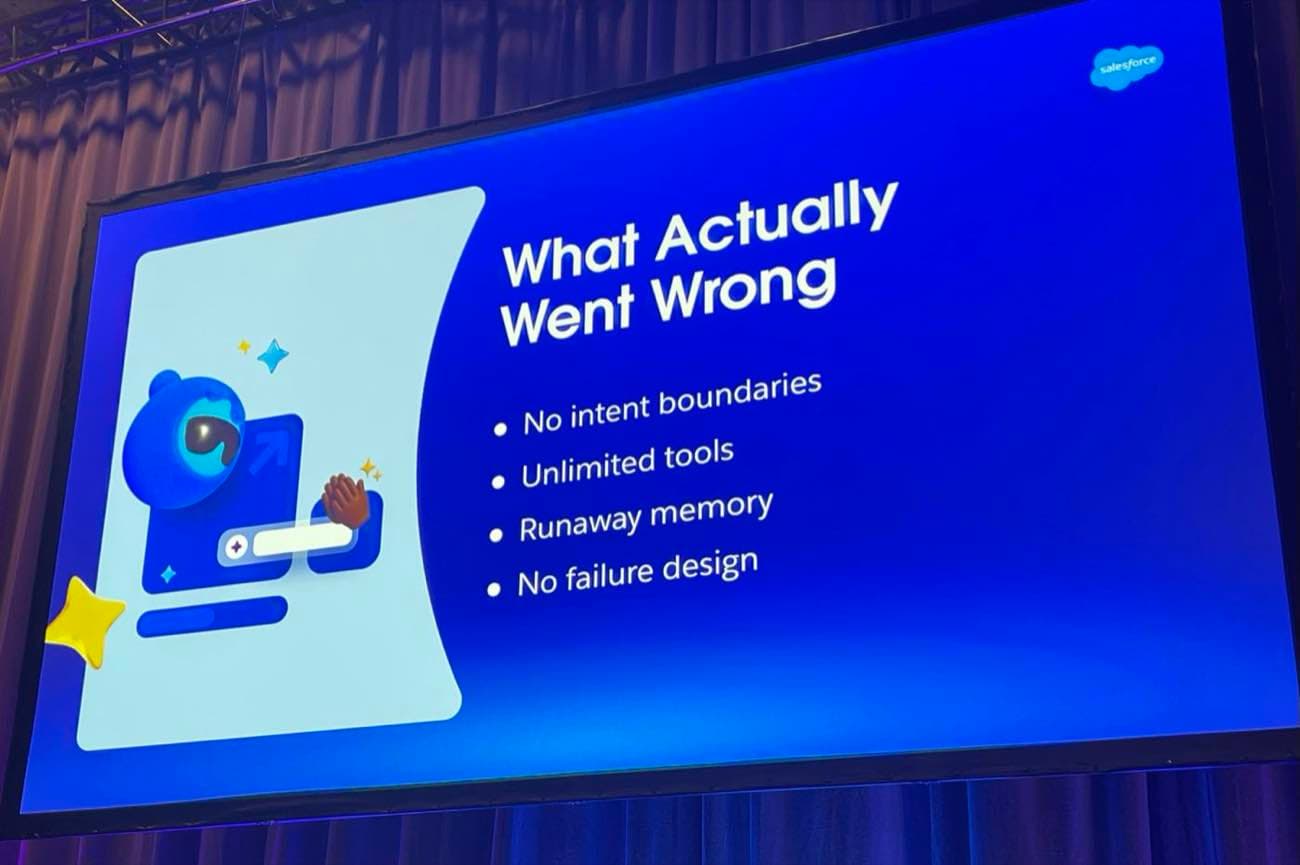
The post-mortem: four architectural failures, one $48,000 invoice
Nobody saw it happen. There was no dashboard. No alerting. No human checkpoint between “agent is doing something” and “agent has done $48,000 of damage.” A week passed before someone opened the billing console and the colour drained from the room.
The model wasn’t hallucinating. The agent wasn’t broken. It was doing exactly what its architecture allowed it to do: improvise, indefinitely, in the dark.
This is the gap between agent prototypes and agent systems. A prototype answers a few questions in a controlled environment. A system runs at scale, with real tools, against real data, a thousand times a day. The behaviours that look harmless at prototype scale become structural risks in production.
The five failure modes that broke this agent
Every broken agent the presenters had rescued failed in some combination of these five ways. They show up everywhere. If you are running any kind of agent in production, work through this table and ask which ones describe your setup.
| Failure mode | What it looks like | What it costs you |
|---|---|---|
| Unclear intent | The agent has no defined responsibility boundary, so it tries to solve everything | Time, money, and trust. The agent answers questions it shouldn't and skips ones it should. |
| Unlimited tools | Too many capabilities, no permission boundaries. The agent picks tools at random. | Wrong actions taken on real records. CRM data modified incorrectly. Audit nightmare. |
| Runaway memory | Conversation history grows indefinitely. Every turn appended to the prompt. | Slower responses. Higher token costs. Reasoning quality degrades over time. |
| No failure plan | Tool fails. Agent retries. Tool fails again. Agent retries again. Forever. | API bills like the one in the title. No human ever sees the failure. |
| No observability | Nobody on the team can explain why the agent did what it did | Debugging is impossible. Incidents repeat. Trust collapses. |
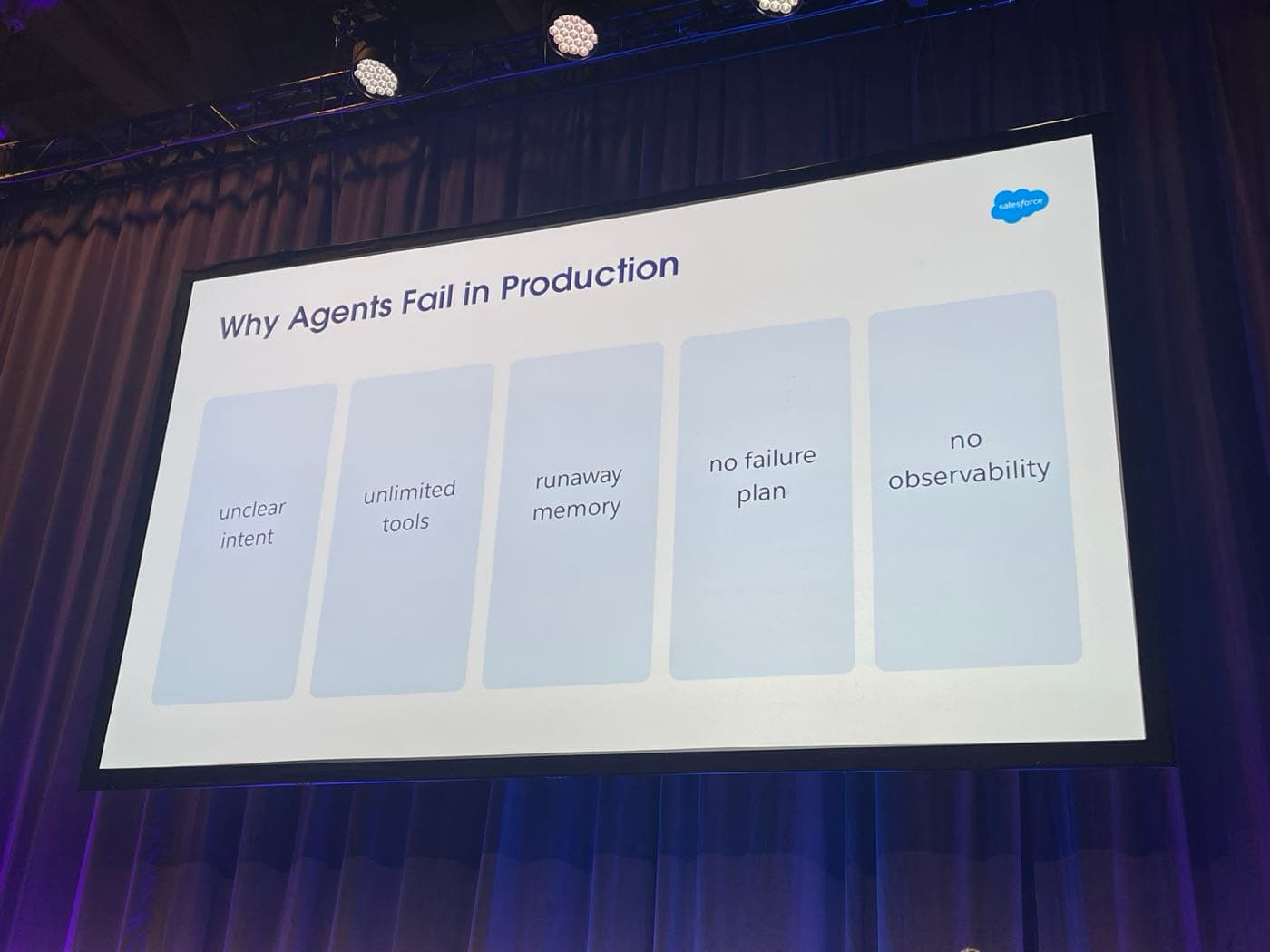
Five failure modes. Most production agents fail in three or more.
None of these is exotic. None of them needs new technology to fix. They are architecture choices that someone needs to make on purpose, before the agent goes anywhere near production.
“Agents that work in demos are not the same as agents that survive in production.”
The Agentic Seven: a framework for agents that survive
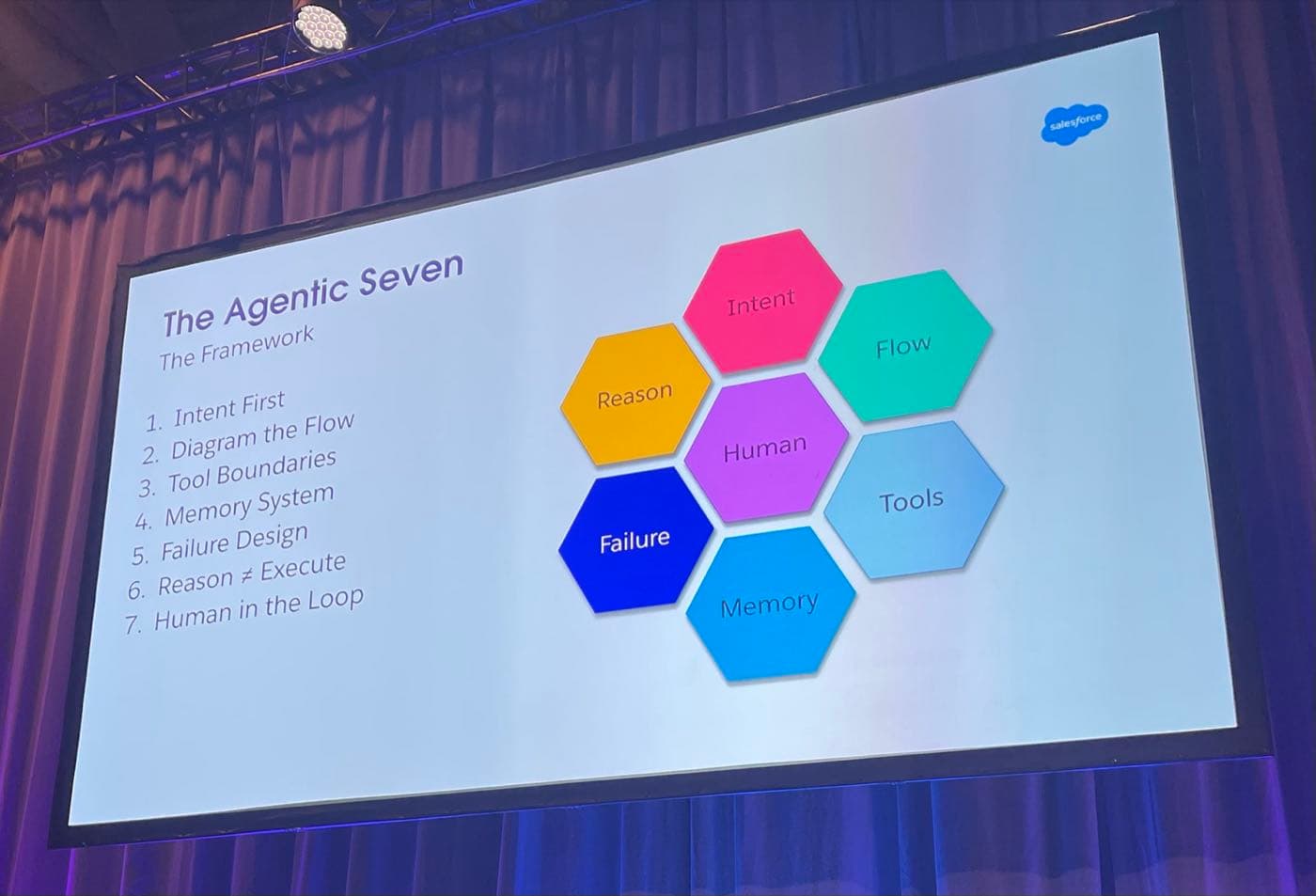
The presenters gave their framework a name: the Agentic Seven. Seven design principles, drawn from the agents they had built and the agents they had rescued. Not theoretical. Not aspirational. The practical checklist that separates an agent that holds up from one that runs up a $48,000 bill.
| Principle | The question it answers |
|---|---|
| 1. Intent | What is the agent responsible for, and what should it refuse? |
| 2. Flow | If you can't draw the agent's flow, should you build it? |
| 3. Tools | What can the agent do, and what are the boundaries on each capability? |
| 4. Memory | What does the agent remember between steps, and what should it forget? |
| 5. Failure | When something breaks, what happens next? Retry, fallback, or escalate? |
| 6. Reason ≠ Execute | Is the planning step separated from the doing step, so you can inspect each? |
| 7. Human in the Loop | Where are the checkpoints for high-risk, low-confidence, or customer-impacting actions? |
Six of these are layers in the system. The seventh, failure design, is different. Failure design isn’t a layer. It applies across every layer. Intent can fail. Tools can fail. Memory can fail. The reasoning step can fail. Each one needs its own recovery path.
1. Intent: define what the agent will refuse
Intent is the responsibility boundary. A weak intent statement says “help the sales team.” A strong one says “summarise account history and suggest next steps before sales meetings.” The strong one tells the agent what it owns. It also implies what it doesn’t.
The questions the presenters use: What problem is this agent responsible for? What actions can it take? What problems should it refuse?
2. Flow: if you can’t draw it, don’t build it
Before any code, draw the flow. User request arrives. Intent is determined. A plan is made. Tools are called. Results are validated. Response goes back. It looks like a process diagram, because it is one.
This sounds basic. Most teams skip it. They prototype directly in Canvas or Script and figure out the flow as they go. That works for a demo. For production, the missing diagram is exactly where the failures hide.
3. Tools: treat them like APIs, gate them like APIs
Every tool an agent can use should behave like an API: clear inputs, clear outputs, defined permission boundaries, monitoring on every call.
The pattern the presenters recommended is a gateway layer between the agent and the tools. The agent doesn’t call the CRM directly. It calls the gateway. The gateway validates the input, checks permissions, restricts sensitive actions, logs the call, then forwards to the tool. When something goes wrong, the gateway is where you debug.
Without a gateway, you are giving the agent direct access to dozens of tools and trusting it to behave. That trust is misplaced.
4. Memory: design it, don’t default to it
Most agents treat memory as a transcript. Every interaction appended to the prompt, forever. That is the default. It is also one of the cheapest failure modes to avoid.
A better design splits memory into types:
- •Short-term context: what we are talking about right now
- •Summaries: a compressed version of past interactions, not the full transcript
- •Structured state: known facts about this case, this customer, this session
- •Long-term knowledge: the knowledge base, SOPs, anything in an external store
Instead of storing 50 messages, the system stores a summary of the steps the customer has already taken. Smaller context window. Lower cost. Better reasoning. The bill stops climbing.
5. Failure: assume it, design for it
Production systems must assume failure will happen. Tools time out. APIs return junk. Models give unexpected outputs. The question is what the agent does next.
The recovery sequence the presenters use:
- •Retry. The first attempt failed. Try again, with backoff.
- •Fallback. Retries failed. Try a different source. Or ask the user for clarification.
- •Escalate. Fallback failed too. Hand it to a human. Don’t guess.
The $48,000 agent had no fallback and no escalation. It just retried, forever, into a wall, paying for every attempt.
6. Reason and execute as separate steps
One of the most powerful patterns in the framework: separate reasoning from execution. The agent first analyses the problem and creates a plan. Then it executes the plan. Two distinct steps.
The reason this matters is debugging. If reasoning and execution are one blob, you can’t inspect either in isolation. If they are separated, you can read the plan before it runs. You can approve it. You can intervene. For high-risk systems, this separation is the difference between a system you can certify and one you can’t.
7. Human in the loop, on purpose
This is the seventh principle and the one that sits in the centre of the framework. The presenters were explicit: if you don’t keep humans in control somewhere, you get unpredictable results.
The trick is choosing the right checkpoints. Not every action needs a human reviewer. The good ones are:
- •High-risk decisions: anything irreversible, anything financial, anything regulated
- •Low-confidence results: when the agent itself is unsure, flag for review
- •Customer-impacting actions: if the result lands in front of a customer, an email or a refund or a status change, a human signs it off
The best agents don’t remove humans. They remove the things humans shouldn’t have been doing in the first place, and they put the human in the right place at the right time.
The Agentic Stack: how the seven principles fit together
The Agentic Seven is the checklist. The Agentic Stack is the architecture that holds them together. The presenters drew it as a layered model, top to bottom: Human, Intent, Reason, Plan, Tools, Memory, Systems.
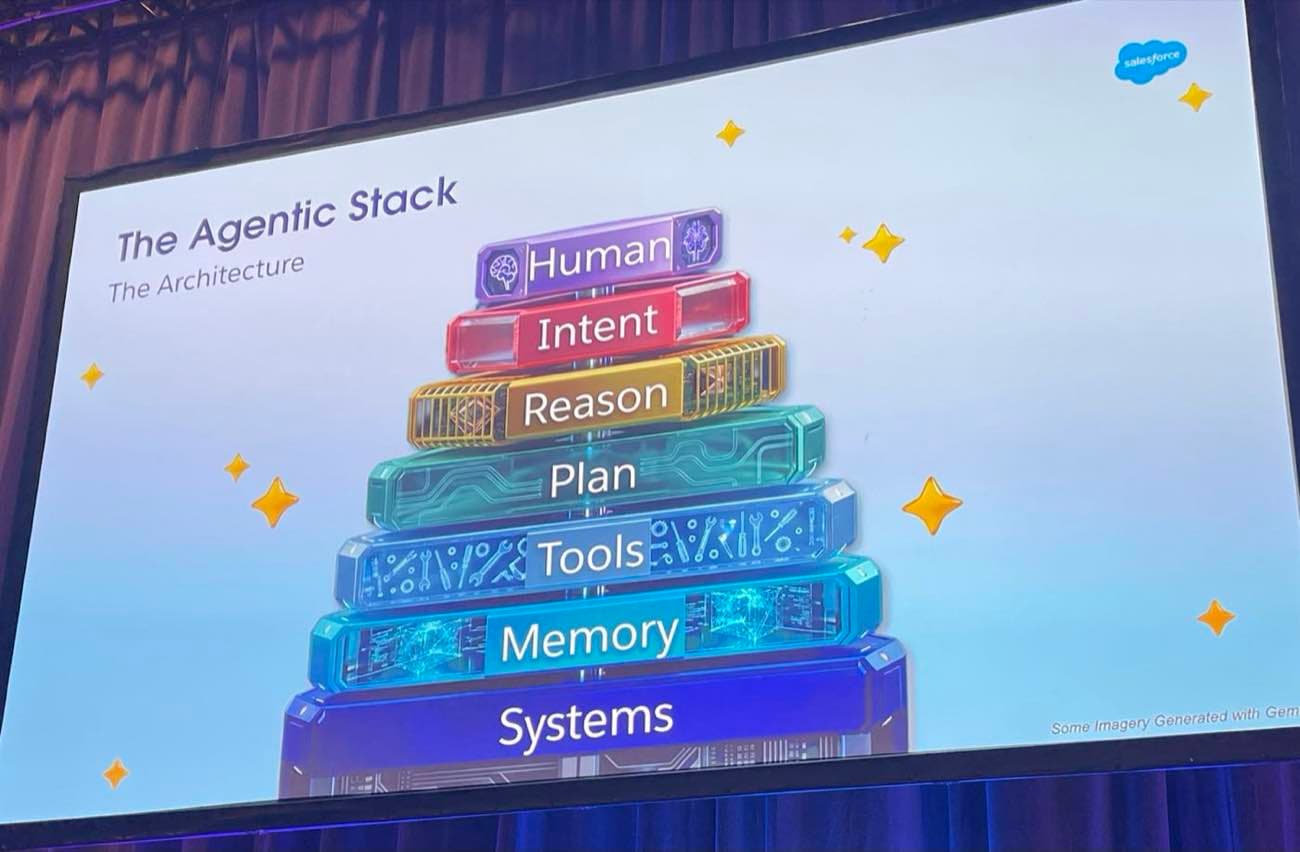
The Agentic Stack: humans at the top, systems at the bottom, the agent in the middle
Read top down, the stack tells you who is in charge and what they need from each layer below. The human starts with intent. Intent gets translated into reasoning. Reasoning produces a plan. The plan calls tools. Tools touch systems. Memory threads through every level so the agent doesn’t lose context as it moves up and down.
Failure design isn’t shown as a layer because it isn’t one. It is the recovery logic embedded into every layer of the stack. Intent fails: refuse and clarify. Reasoning fails: ask the human. Plan fails: replan. Tool fails: retry, fallback, escalate. Memory fails: rebuild from structured state. Systems fail: alert and pause.
If you can sketch your own agent on this stack and explain what happens at every layer when something fails, you have the architecture. If you can’t, you have a prototype.
How to apply this to your next agent build
If you are about to start an Agentforce project, or you have one running and a quiet worry it might already be the next $48,000 story, here is the practical sequence I’d use.
Before you build
- •Write the intent statement in one sentence. If it includes the word “help” or “assist” without a specific outcome, rewrite it.
- •Draw the flow on a whiteboard. User request to validated response. If you can’t draw it without skipping a step, you don’t understand it yet.
- •List every tool the agent will need. For each one, define inputs, outputs, and the permission boundary. Cut the list ruthlessly. Fewer tools, fewer ways to fail.
- •Decide what the agent will remember. Pick the memory types you actually need. Default to less.
- •Map the failure recovery paths. For every tool call, write down what happens if it fails: retry, fallback, escalate. No blanks.
While you build
- •Put a gateway layer between the agent and your tools. Validate, permission-check, log every call. This is where Agent Script and a small amount of middleware earn their keep.
- •Separate reason and execute. Generate the plan as a step the team can read and approve before it runs.
- •Pick three checkpoints where a human signs off. Not ten. Not none. Three good ones, on the highest-risk transitions.
Before you go live
- •Build the observability dashboard before the agent runs once at production volume. You want to see tool call counts, token spend, error rates, and escalation rates from day one.
- •Set a hard spend cap on the agent’s API access. The presenters didn’t. That cost them $48,000.
- •Run it in shadow mode first. Let it produce answers without acting on them. Compare its outputs to what humans actually did. Tune intent, tools, and memory before any real action goes through.
The cost of architecture is one workshop and a clear diagram. The cost of skipping it is in the title of this article.
What this means for delivery teams
The Agentic Seven isn’t a theoretical model. It is a practical operating brief for any team about to put an agent into production. If your delivery plan doesn’t have explicit answers for intent, flow, tools, memory, failure, separation, and human checkpoints, you are not yet ready to ship.
The Salesforce platform is making the build side easier every quarter. Agent Script gives you determinism. The Agentforce roadmap adds simulation agents and multi-turn testing. Data 360 grounds the agent in clean, observable data. None of those features fix bad architecture. They make bad architecture faster.
The skill that’s most undervalued in agentic delivery right now is the architect’s. Not the prompt engineer’s, not the model wrangler’s. The person who can sit in front of a whiteboard and draw the flow before anyone opens Agent Builder. That is where the next twelve months of value gets protected.
Demo agents are easy. Production agents are an architecture problem. The teams that win the next round of Agentforce work will be the ones that already know the difference.
Want a second pair of eyes on your agent architecture?
If you have an Agentforce pilot in flight, or one about to start, and you want a calm, evidence-led review of the architecture before it gets expensive, let’s talk. We work the Agentic Seven against your real design and give you a one-page risk view your sponsor can act on.
Get in touchFurther reading
Source material and authoritative references for the topics in this article.
- •Salesforce Agentforce platform — the official Agentforce product page, including Agent Script, the deterministic agent definition format referenced throughout this article.
- •Model Context Protocol (MCP) specification — the open standard behind the gateway-layer pattern recommended for tool boundaries.
- •Salesforce Help: Agentforce overview — the official Agentforce documentation, including topics, sub-agents and the Atlas Reasoning Engine.
About the author

You may also like…