Salesforce
Zero Copy, Three Ways: A Plain-English Guide to Data 360 Federation
The Salesforce partner keynote at TDX 2026, translated for the rest of us.
Most enterprises pay three times for the same customer data. Once to store it in the data lake. Once to copy it into Salesforce. Once more in the engineering hours wasted keeping the two in sync. That’s value leakage you can put a number on. It’s also the problem Zero Copy is built to solve.
I sat in the Data 360 partner keynote at TDX 2026 in San Francisco. Two Salesforce data architects from the Data 360 team presented. It was one of the densest sessions of the conference, and I’m a programme director, not a data architect. The first ten minutes I spent working out whether “hyperscaler” was a noun or an adjective. By the end I understood why this is the quiet architectural decision that defines what every Agentforce build will cost you over the next three years.
This is the version of the talk I wish I’d been handed before I walked in. Plain English first. Architecture second. The trade-offs that matter to a CIO third.
First, what is Data 360?
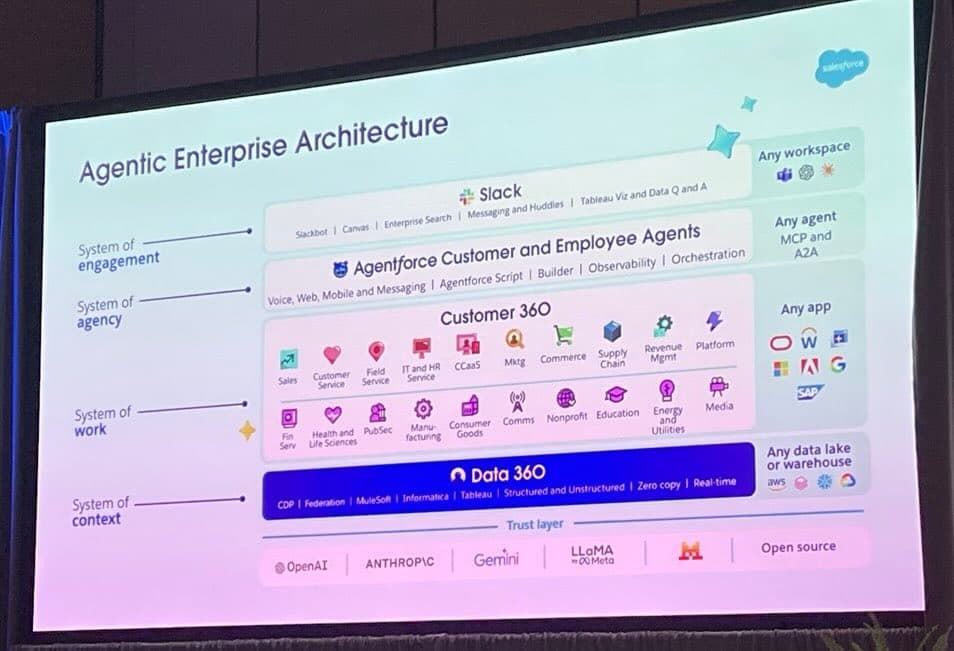
Data 360 is the data layer underneath every Salesforce app. Sales, Service, Marketing, Tableau, Agentforce: they all sit on top of it. It used to be called Data Cloud. Salesforce renamed it because they want you to think of it as the place your single customer view lives, rather than a separate product you bolt on.
The Salesforce team framed it at the keynote as three jobs. Connect data from anywhere. Activate that data inside Salesforce and out to other systems. Ground your AI agents in the real, current state of the business so they don’t make things up. The third one is why this matters more than it used to. An Agentforce agent without Data 360 is a confident stranger talking about your customers.
Why “Zero Copy” matters before you understand it
Every time you copy data, you pay twice. Once to store it. Once to keep both copies honest. Multiply that across every system in a typical enterprise and the bill stops being trivial. One UK insurer I work with runs 22 business units on a Reltio MDM platform, with direct integrations into multiple Salesforce orgs. Every department enriches the same accounts in slightly different ways. Every pipeline carries a small risk of going stale. Every business case has to argue for storage the company is already paying for somewhere else.
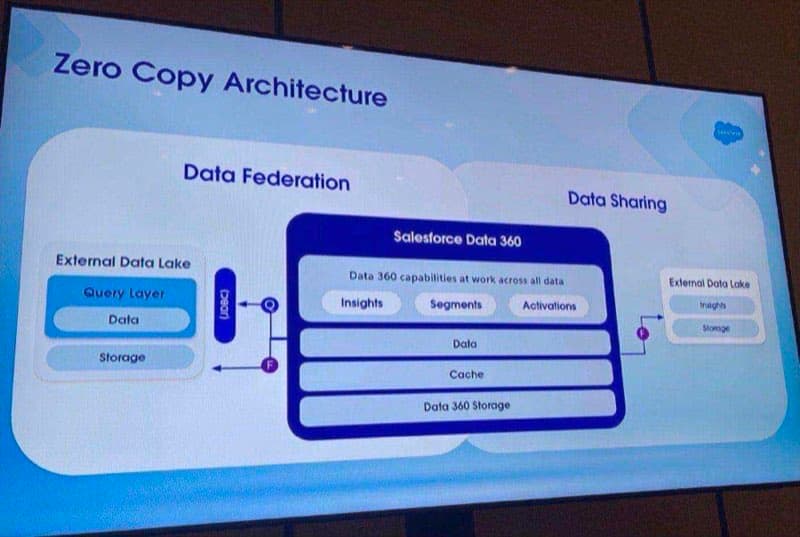
Zero Copy is the answer to that pattern. Instead of moving the data into Data 360, you connect to it where it already lives. One version of truth. No duplicate storage. Fewer pipelines to break. That’s the promise. The reality is more interesting.
Five terms you need before we go further
The session assumed everyone in the room already knew the vocabulary. I didn’t. Here are the five terms that matter, in the order they show up.
- Hyperscaler. The big cloud data warehouses where most enterprises now keep the bulk of their data. Snowflake, Databricks, BigQuery and Redshift are the four you’ll hear most often.
- Data lake. Where your hyperscaler keeps the raw data, often stored as files in a format called Parquet, organised into tables called Iceberg.
- Federation. Querying data where it lives instead of moving it. The data stays in the hyperscaler. You ask a question. The answer comes back. Nothing is copied.
- JDBC (Java Database Connectivity). The standard connector Data 360 uses to ask the data lake a question. Think of it as the wire between the two systems.
- Iceberg / Parquet. File formats that make File Federation possible. Data 360 can read these files directly without the data lake doing any work.
The borrowing sugar analogy
Salesforce uses a cartoon to explain federation. It’s the moment the whole thing clicked for me. Two neighbours. One kitchen cupboard. A bag of sugar. The only question is who fetches the sugar, and who pays for the work.
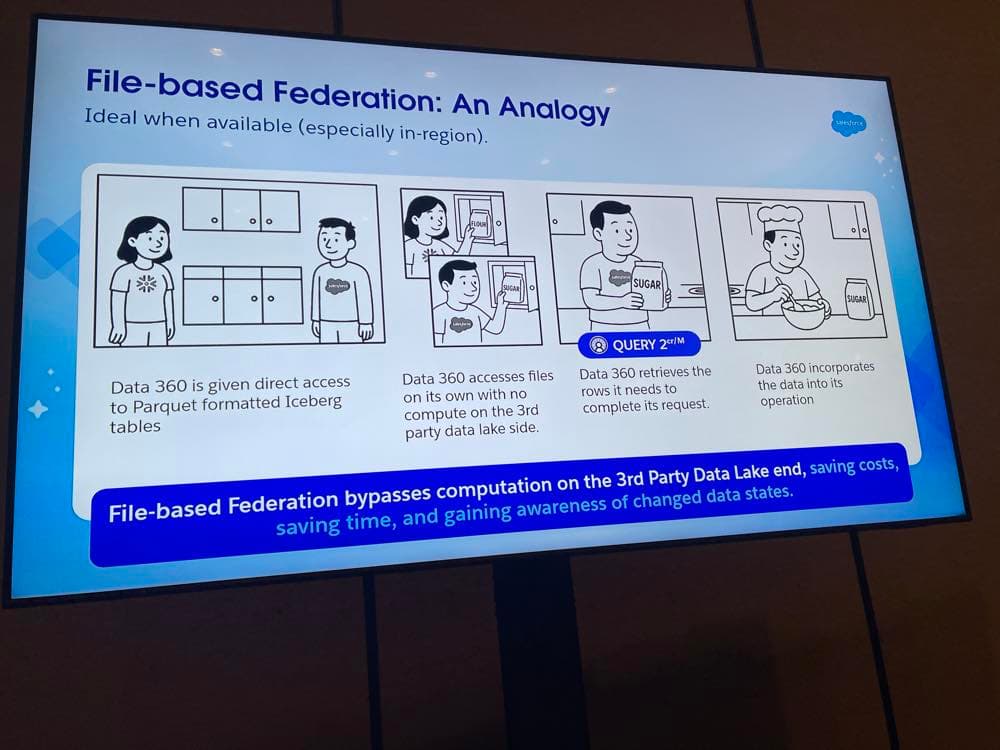
File-based federation: the neighbour fetches the sugar themselves. No work for the cupboard owner.
Hold that picture. The cupboard is your hyperscaler. The sugar is your data. Data 360 is the neighbour with the recipe. The three federation patterns are three different ways of getting the sugar into the bowl, and each one shifts the work and the cost in a different direction.
Three ways to do Zero Copy
At a glance:
| Pattern | Where the work runs | Cost shape |
|---|---|---|
| Query Federation | On the data lake. Snowflake, Databricks or BigQuery does the compute. | You pay your hyperscaler for every query. |
| File Federation | Inside Data 360. The lake just hands over the file. | Lowest total cost. Only works for Parquet/Iceberg files. |
| Caching | Inside Data 360. The data is copied locally on a schedule. | Fast and predictable. Only suits data that changes slowly. |
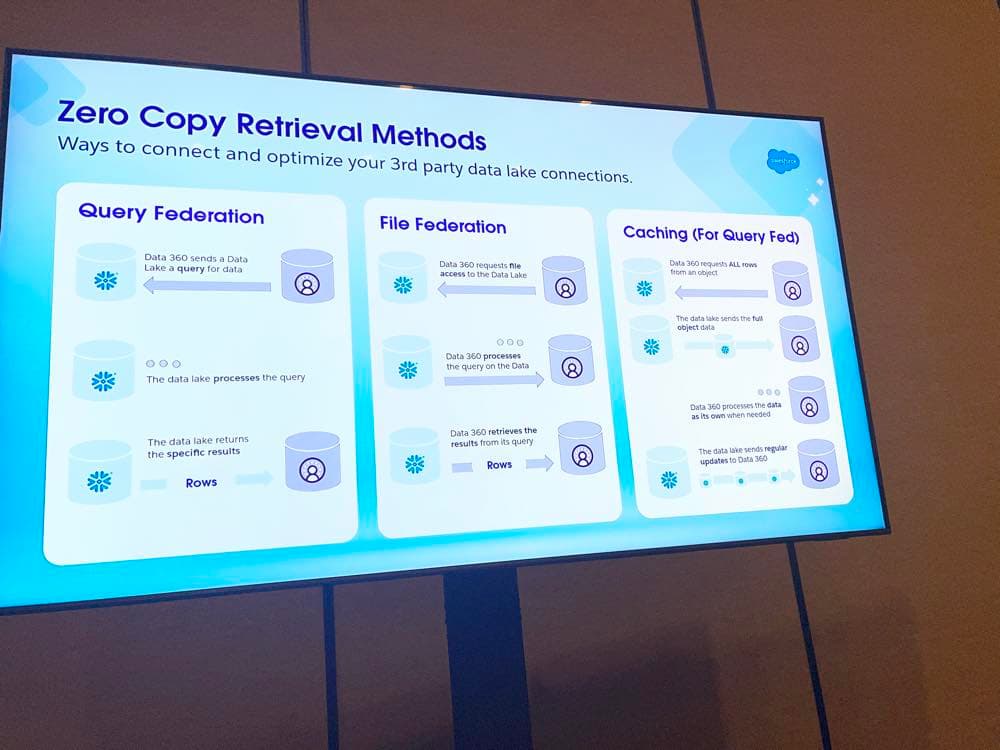
Query Federation, File Federation and Caching: same goal, three very different routes.
Query Federation: you ask, the data lake answers
In query federation, you write a query against your zero-copy data inside Data 360. Behind the scenes, Data 360 pushes that query down to your hyperscaler. Snowflake (or Databricks, or BigQuery) does the work, finds the rows, and sends them back. You run any further calculations inside Data 360.
In sugar terms: you ask your neighbour for two cups. They open the cupboard, measure it out, hand it over. You walk it back to your kitchen and bake the cake.
This is the most popular pattern because it’s the most flexible. It works on any hyperscaler. It supports any query. The trade-off is cost. The compute happens on the hyperscaler side, and you pay them for it. Run the same query a thousand times an hour because your Agentforce agent is curious, and the bill grows in a way most architects haven’t budgeted for.
File Federation: you fetch the cupboard yourself
File federation is the cartoon in action. The hyperscaler doesn’t process anything. It just gives Data 360 direct access to the underlying files (Parquet) inside the table structure (Iceberg). Data 360 does the work itself. Opens the file. Runs the query. Gets the rows.
The trade-off is the opposite of query federation. Lower total cost of ownership, because the hyperscaler is no longer running compute on your behalf. The catch: it only works for Parquet or Iceberg files, and the optimisation options are more limited. The rule of thumb the architects shared is worth pinning up. If the data is in-region and the format is right, this is the cheapest pattern available. Most teams who haven’t looked at it should.
Caching: you keep the sugar in your own kitchen
Caching is the third pattern, and it’s where the language gets a bit loose. With caching, Data 360 copies the data into a local cache layer on a schedule. From then on, queries hit the cache, not the hyperscaler.
Use this for slowly-changing data. Price lists. Product hierarchies. Anything that updates once every few hours rather than every few seconds. The framing in the room was direct: if it’s changing once every six or seven hours, there’s no point hitting the wire. Cache it. Your Agentforce agent gets faster responses, and the cost stops scaling with traffic volume.
The honest caveat: technically, this isn’t really “zero copy” any more. The data is being copied into the cache. The architectural intent is the same though. The hyperscaler stays your source of truth, and you’re trading freshness for speed and cost.
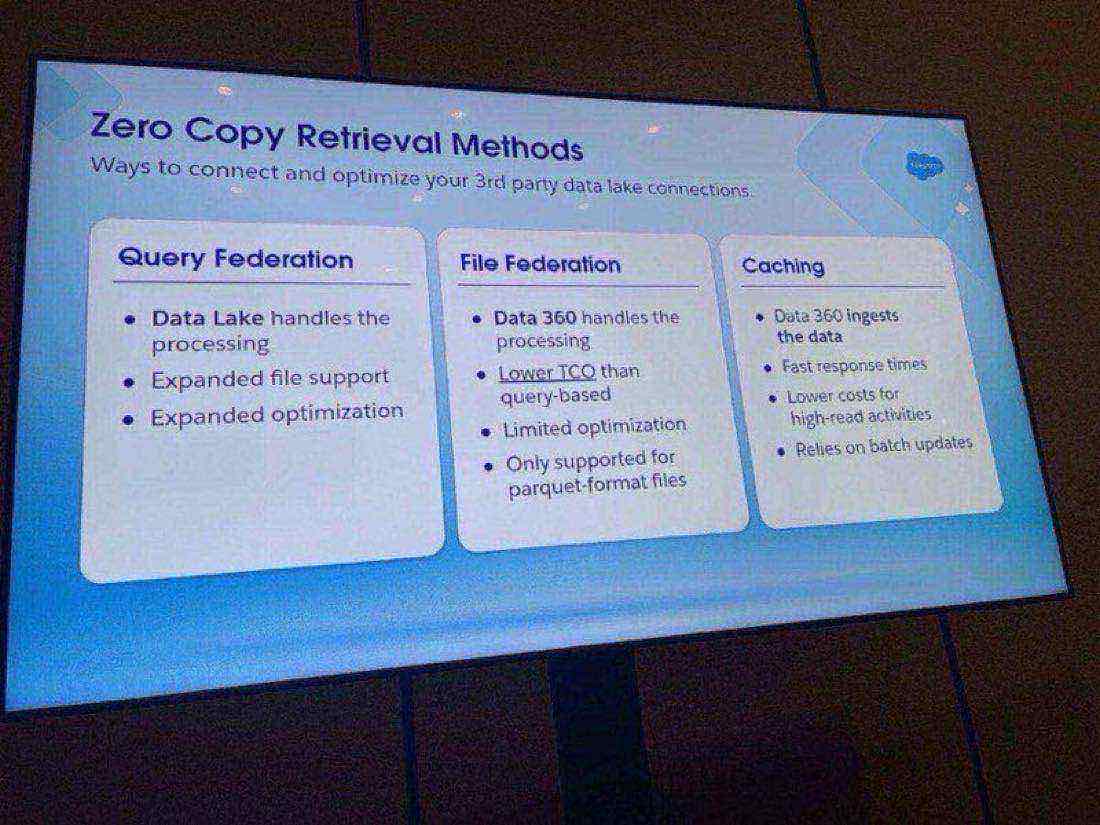
Three patterns. Three sets of trade-offs. The decision is rarely either-or.
“If the data is changing once every six hours, there’s no point hitting the wire. Cache it.”
Which pattern, when?
The patterns aren’t mutually exclusive. Most real architectures use all three, for different datasets. The skill is matching the pattern to the shape of the data, the rate it changes and the volume of reads against it.
| If your data is... | And you need... | Use |
|---|---|---|
| High-volume transactions in Snowflake | Real-time accuracy at query time | Query Federation |
| Stored as Parquet or Iceberg in-region | Lowest cost and awareness of changes | File Federation |
| Slowly changing (price lists, hierarchies, product master) | Speed and predictable cost | Caching |
| Sat in another Salesforce org or business unit | Sharing without copying, across regions | Data Cloud One / Data Share |
Treat it as a starting point, not a verdict. The real decision factor is what the data is being used for. An Agentforce agent that runs the same lookup a thousand times a day is a very different cost profile to a marketing segmentation that runs once a week.
The bit nobody’s talking about: Profile vs Engagement vs Other
This was the slide most attendees missed. It’s also the one most likely to bite the teams who skip it. When you bring data into Data 360, you classify it as one of three categories: profile, engagement or other.
Profile data has a one-to-one relationship with your account, contact or lead. Demographics, preferences, anything that’s an extension of who the customer is. Engagement data has a one-to-many relationship. Transactions, web events, service interactions, anything the customer does over time. Other is everything else: reference data, lookups, the bits that don’t fit the first two.
Why this matters: Data 360 uses the category to optimise the push-down query. Classify a transactional dataset as profile when it should be engagement, and the optimiser doesn’t know which fields to push down as filters. Your queries get slower and more expensive, and nobody working with the system can tell you why. You’re not physically reading the data (it stays in Snowflake), but you can still establish the relationship between, say, the Account object in Salesforce and the Transactions object in your data lake. That’s how the optimiser does its job.
It’s the kind of detail that doesn’t show up in a vendor demo and only matters six months in. Get it right at the start, or get it wrong for years.
One more thing: hybrid vector search for unstructured data
Zero Copy handles structured data. For unstructured data (PDFs, documents, knowledge articles) Data 360 chunks the content, turns it into vectors and stores it for retrieval. There are two ways to search it now: pure vector (semantic similarity), or hybrid (vector plus keyword match).
The bit from the session that I think most teams should hear: set a similarity score threshold. The architects suggested 0.68 to 0.75 as a working range. Below the threshold, throw the result away. Without it, your Agentforce agent retrieves noise, builds context out of it, and confidently answers the wrong question. The score is the cheapest quality control you can apply. Most teams aren’t using it.
The pricing change that quietly rewrote the business case
Until recently, ingestion charges were one of the loudest reasons not to put data in Data Cloud. Real-time ingestion was expensive enough that architects routinely designed around it.
That changed quietly at TDX. Under the new flex credits model, all ingestion is now free. Real-time, accelerated, batch, all of it included. A handful of compute-heavy services still meter (unstructured processing is the main one), but the pool of credits flexes across data cloud usage rather than being billed line-by-line.
The architectural decision has moved up the stack. It used to be “how do we minimise rows ingested.” Now it’s “where do we want the work to run.” That’s a healthier conversation, and a different one.
If your last Data Cloud business case was built on the old pricing, redraw it. The cost shape has shifted, and the cases that used to be marginal now stand up.
What I’d tell a CIO in the lift
If you have Data 360 on the roadmap and twenty seconds to brief a sponsor, three questions land harder than any architecture diagram.
The first one. Do we know which of our datasets are profile and which are engagement? If the answer is no, the team is optimising blind, and the cost story will surprise the sponsor in month six.
The second one. Have we costed the compute of every federated query, or only the storage we’ve saved? The Zero Copy pitch is about storage. The real bill is in compute. Both numbers belong in the business case.
The third one, and this is the one I’d want to ask first. Is the data team treating Zero Copy as an architecture decision, or as a cost-saving feature? Those are different conversations. Architecture asks where the work should run. Cost-saving asks how cheap it can be. The teams that get value out of this technology are having the first conversation. The teams that don’t are stuck in the second.
Zero Copy doesn’t remove the data architecture problem. It moves it. The teams that win are the ones who treat the move as a chance to regain control, rather than a chance to skip the conversation.
Building a Data 360 case that has to stand up to scrutiny?
If you’re shaping the architecture, the business case, or the delivery plan for Data 360 and want a calm, evidence-led second opinion before it lands in front of an exec, fractional advisory exists for exactly this. We work the patterns against your real data, your real systems and your real budget, and give you a one-page view your sponsor can act on.
Explore fractional advisoryFurther reading
Source material and authoritative references for the topics in this article.
- •Salesforce Data 360. The official product page covering ingestion, federation, semantic models and Agentforce grounding.
- •Apache Iceberg. The open table format that makes file federation possible.
About the author

You may also like…